
Top 6 CRMs for Business Success in 2026 (and How to Get More From Each With CTM)
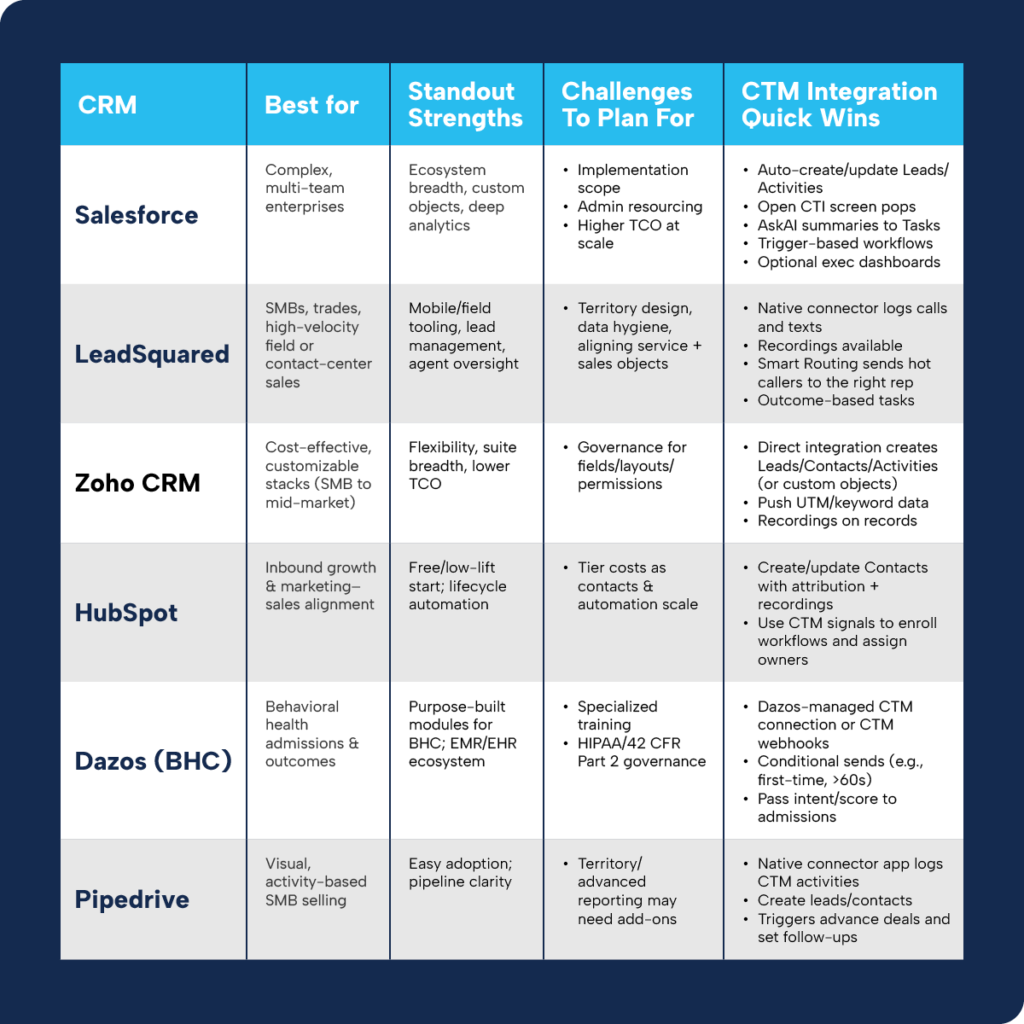
Choosing a customer relationship management (CRM) platform is one of the highest‑impact decisions you’ll make in 2026. Choosing a customer relationship management (CRM) platform is one of the highest-impact decisions you’ll make in 2026. The right choice depends on how your teams sell (inbound, field, admissions, or service), how complex your data model is, and which integrations you need to keep revenue reporting accurate.
This guide offers a practical look at six leading CRMs, plus how each works with CTM to ensure every call, text, chat, and form submission is captured, attributed, and acted on automatically.
Before you choose: consider team size and roles, sales cycle complexity, integration requirements, reporting/compliance, and total cost of ownership.
1) Salesforce: Enterprise Powerhouse
Overview
Salesforce is a modular CRM platform used by mid-market and enterprise organizations to unify sales, service, marketing, and analytics at scale.
Who’s it’s for
- Multi‑brand or multi‑location organizations
- Teams with complex sales and service handoffs
- Companies that require strong governance and extensibility
Challenges to plan for
Salesforce implementations often require more time and change management than lighter CRMs. Plan for dedicated admin ownership, either in-house or through a partner, to manage fields, automations, and permissions. Model total cost of ownership early; advanced modules and add-ons can significantly increase spend as you scale.
How Salesforce integrates with CTM
- Auto‑create/update records: Push calls, texts, and form submissions into Salesforce as Leads or Activities with full attribution.
- Open CTI experience: Handle calls directly in Salesforce with CTM’s Softphone, screen pops, and intelligent routing.
- Trigger‑based automation: Use CTM triggers (qualified, missed, voicemail, form submitted) to create Tasks, update status, and enroll flows.
- AI handoff: AskAI AskAI generates post-call summaries and classifications to speed follow-up..
- Optional analytics: Pipe CTM data to Marketing Cloud Intelligence (Datorama) for roll‑up dashboards.
Mini case: Banyan processed 8,000 first‑time calls last month without manually entering a single Salesforce record. CTM created the right objects with accurate attribution so the team could focus on conversations, not data entry.
2) LeadSquared: SMB & Field Velocity
Overview
LeadSquared is an AI‑enabled CRM designed for sales, service, and marketing teams with strong mobile and call-center workflows.
Who’s it’s for
- Home services, manufacturing, education, and BFSI
- High-volume inbound teams and field sales motions
- Teams that need geo‑aware assignment and offline mobile updates
Challenges to plan for
Clear territory definitions and data hygiene rules are critical, especially for mobile teams. Align sales and service objects early to avoid routing conflicts and reporting gaps.
How LeadSquared integrates with CTM
- Native connector: Log call activity, attach recordings, and surface lead details for agents
- Right‑rep, right now: Use smart routing in CTM to route qualified calls by location, schedule, or caller history..
- Outcome‑driven tasks: Map CTM outcomes (qualified, booked, voicemail) to lead stages and auto‑create follow‑ups to meet SLAs.
3) Zoho CRM: Flexible, Cost‑Effective Control
Overview
Zoho CRM offers robust functionality within the broader Zoho suite, making it popular with teams that value customization without heavy developer effort.
Who’s it’s for
- SMB to mid‑market teams standardizing on Zoho
- Organizations with moderate customization needs
- Cost-conscious teams seeking lower TCO
Challenges to plan for
Without a governance plan, fields, layouts, and customizations can sprawl and slow your team, so assign an owner to keep configuration lean. Coordinate permissions and process standards across Zoho apps to keep changes consistent and auditable. Document a light but regular admin cadence to prune unused fields and keep automation predictable.
How Zoho integrates with CTM
- Direct integration: Create/update Leads, Accounts, Contacts, Deals, Activities, or custom objects from calls, texts, chats, and forms; preserve UTM and keyword data.
- Faster follow‑up: Attach recordings and transcripts; trigger Zoho workflows from CTM events (e.g., missed call → callback task within SLA).
- Web‑to‑call: Use FormReactor to capture website forms instantly and and connect prospects to agents in real time.
4) HubSpot: Inbound Growth & Alignment
Overview
HubSpot combines a free CRM with Marketing, Sales, and Service Hubs to help growing teams align campaigns, conversations, and reporting.
Who’s it’s for
- Inbound‑led companies and agencies
- Scale‑ups that rely on lifecycle automation
- Organizations that value fast time to value
Challenges to plan for
Monitor how contact volume and automation tiers affect cost as your database grows, and forecast usage before large campaigns. Establish a clear workflow architecture, including naming conventions, triggers, and ownership. This helps automations remain understandable and easy to troubleshoot. Schedule periodic audits of enrollment criteria to avoid unintended enrollments and conflicting actions.
How HubSpot integrates with CTM
- Complete contact timelines: Sync CTM activities with attribution, analytics, and recordings.
- Trusted automation: Use CTM signals (qualified, missed, high intent) to enroll HubSpot workflows, assign owners, and personalize nurture.
- Context for Coaching: Sync AskAI summaries into notes/properties so reps know what to do next without replaying calls.
5) Dazos (Behavioral Health): Admissions‑Ready CRM
Overview
Dazos is purpose-built for behavioral health organizations, with preconfigured modules for admissions, marketing attribution, and EMR and EHR integrations.
Who’s it’s for
- Addiction and mental health treatment centers
- Multi-location admissions teams
- Organizations with strict compliance needs
Challenges to plan for
If you manage territories or multiple lines of business, anticipate supplementing Pipedrive with add‑ons or external analytics for advanced reporting. Keep your activity model simple and enforced with what gets logged, by whom, and by when. Doing so keeps deals moving without micromanagement. Revisit pipeline stages quarterly to remove clutter and prevent process drift as teams evolve.
How Dazos works with CTM
- Two connection patterns:
- Dazos‑managed connector matches inbound and outbound calls to CRM records and create new leads when needed.
- CTM webhooks/API conditionally sends activity based on criteria like first-time callers or talk time.
- Admissions prioritization: Pass intent and AskAI scores to help teams focus on high-quality inquiries.
6) Pipedrive: Pipeline‑Centric Selling for SMBs
Overview
Pipedrive is a sales-first CRM centered on visual pipelines and activity‑based selling, prized for ease of use and fast adoption.
Who’s it’s for
- Lean or founder-led sales teams
- Agencies and SMBs focused on deal momentum
- Teams that value simple, enforced activity tracking
Challenges to plan for
- Advanced territory management and reporting may require add-ons. Activity discipline is key to preventing process drift as teams grow.
How Pipedrive integrates with CTM
- Native connector app: Log calls, texts, chats, and forms as activities and create leads automatically.; set outcomes via CTM triggers.
- Deal momentum: Advance deals and set follow-ups based on CTM triggers.
- Attribution that teaches: Push campaign and keyword data so you know which channels generate pipeline, not just clicks.
How to choose a CRM for your team
- Motion: inbound vs. field vs. admissions vs. service
- Complexity: single team vs. multi‑brand/regulated
- Reporting: which KPIs must be visible in‑CRM
- Integration: which CTM data (recordings, transcripts, keywords, AI scores) should create/update records and trigger workflows
- Governance: who owns admin, data quality, and workflow standards